






Top 10 Website Features Every Business Must Have in 2026
You know that sinking feeling when you land on a website and can't find what you need? Maybe the menu's buried, the chatbot's useless, or the whole thing looks like it was built in 2012. Yeah, your customers feel that too.
Here's the thing: your website isn't just a digital brochure anymore. It's your 24/7 salesperson, your customer service rep, and often the first (and last) impression someone gets of your business. Get it wrong, and they're clicking over to your competitor before you can say "bounce rate."
So what separates a website that converts from one that collects dust? Let me walk you through the 10 features that'll make your site work harder than your best employee in 2026.
1. Mobile-First Design (Not Mobile-Friendly, Mobile-FIRST)
Let's get real for a second. Over 60% of web traffic comes from phones now. If your site doesn't load perfectly on a smartphone, you're basically telling most of your audience to leave.
Mobile-first design means you build the phone version first, then scale up to desktop. Why? Because it forces you to prioritize what actually matters. No room for fluff when you're working with a 6-inch screen.
What this looks like:
- Thumb-friendly navigation (buttons big enough to tap without zooming)
- Text that's readable without pinching
- Forms that don't make people want to throw their phone
- Fast loading times (we're talking under 3 seconds)
I've seen businesses double their leads just by fixing their mobile experience. That's not a typo. Double.
If you're looking for a business website design that actually works on mobile, don't try to retrofit an old desktop site. Start fresh with mobile in mind.
2. Lightning-Fast Page Speed
Nobody's waiting around for your site to load. Google found that 53% of mobile users bail if a page takes longer than 3 seconds. Three. Seconds.
Your fancy animations and high-res hero images? They're costing you money if they're slowing things down.
Speed killers to watch out for:
- Unoptimized images (compress them, seriously)
- Too many plugins or scripts
- Cheap hosting that can't handle traffic
- Videos that autoplay (stop doing this, please)
Run your site through Google PageSpeed Insights. If you're not hitting at least 80 on mobile, you've got work to do. And yeah, search engine optimization includes technical stuff like this, not just keywords.
3. Clear Value Proposition Above the Fold
"Above the fold" means what people see before they scroll. And you've got about 5 seconds to tell them why they should care about your business.
Your headline shouldn't be clever or vague. It should answer one question: "What's in it for me?"
Bad headline: "Welcome to ABC Solutions"
Good headline: "Get More Leads Without Spending More on Ads"
See the difference? One's generic corporate speak. The other promises a specific benefit.
Check out these portfolio website design examples to see how the best sites nail their value prop right away.
4. Intelligent Chatbot or Live Chat
You ever notice how the best customer service happens in seconds, not days? That's why chat features aren't optional anymore.
But here's where most businesses mess up: they install a chatbot that can't actually help anyone. You know the kind. Asks your question three different ways and then tells you to email support.
A good chat system:
- Answers common questions instantly (shipping times, pricing, hours)
- Connects to a real human when needed
- Doesn't pop up every 3 seconds like an annoying telemarketer
- Captures leads even when you're offline
AI's gotten scary good at this stuff in 2026. The chatbots that work now can actually understand context and solve problems. No more "I'm sorry, I didn't understand that."
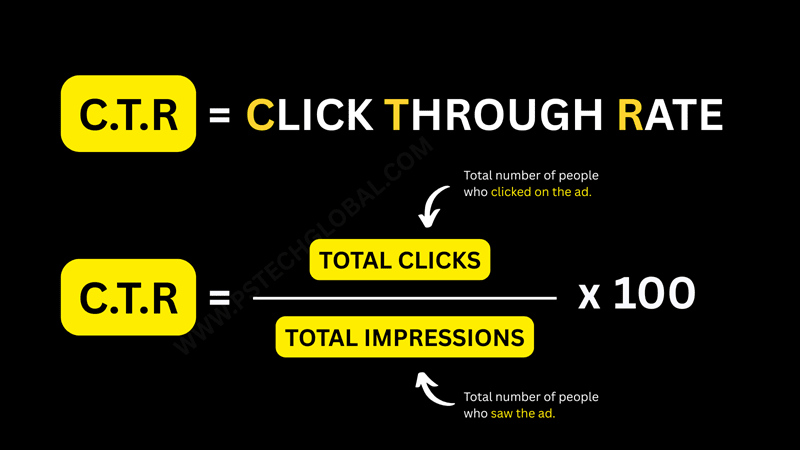
5. Compelling CTAs (Calls to Action)
Every page should guide people toward doing something. Buying, signing up, calling, downloading. Whatever moves them closer to becoming a customer.
Your CTA buttons can't just say "Submit" or "Click Here." That's lazy. They need to tell people exactly what happens when they click.
Weak CTA: "Learn More"
Strong CTA: "Get Your Free Quote in 60 Seconds"
The second one removes doubt. You know what you're getting, and you know it won't take all day.
And please, make your buttons look like buttons. I've seen too many minimalist designs where you can't tell what's clickable. Form follows function, not the other way around.
Want to see how a proper CTA flows with your overall design? Check out examples from a web design company in Gurgaon that gets conversion rate optimization.
6. Social Proof That Actually Proves Something
Reviews. Testimonials. Case studies. Social proof is the digital version of word-of-mouth, and it's powerful.
But fake-looking testimonials with stock photos? They hurt more than they help. People can smell BS from a mile away.
Social proof that works:
- Real customer photos (or at least real names and companies)
- Specific results ("Increased sales by 47%") not vague praise ("Great service!")
- Video testimonials when possible
- Trust badges from recognized organizations
- Real-time activity ("23 people viewing this product")
Take a look at these case studies to see how actual results tell a better story than generic five-star ratings.
7. Accessibility Features (Because Everyone Deserves Access)
About 1 in 4 adults has some type of disability. If your site isn't accessible, you're excluding 25% of potential customers. Plus, accessible sites tend to rank better in search engines anyway.
Basic accessibility checklist:
- Alt text on all images (describes what's in the picture)
- Proper heading hierarchy (H1, H2, H3 in order)
- Keyboard navigation (not everyone uses a mouse)
- Color contrast that's readable
- No flashing content that could trigger seizures
- Captions on videos
This isn't just about being nice. In some places, it's actually the law. The ADA applies to websites now, and businesses have been sued for having inaccessible sites.
8. Search Functionality (If You Have More Than 20 Pages)
Think about how you use websites. When you can't find something fast, what do you do? You hit that search bar.
If your site has a bunch of products, services, or blog posts, people need a way to cut through the noise. A good search function with filters and predictive text can be the difference between a sale and someone giving up.
Search features that help:
- Auto-suggestions as you type
- Filters for categories, price ranges, etc.
- Search results that actually match what you're looking for (not just keyword stuffing)
- Recently searched terms for returning visitors
For ecommerce website design, search is absolutely critical. Nobody's scrolling through 500 products to find the one they want.
9. Secure HTTPS and Trust Signals
That little padlock in the address bar? It matters more than you think.
HTTPS (the 'S' stands for secure) encrypts data between your site and your visitors. Without it, browsers literally warn people that your site isn't safe. Would you buy from a site with a "Not Secure" warning? Didn't think so.
Other trust signals:
- SSL certificate (gets you that padlock)
- Privacy policy that's actually readable
- Clear contact information (address, phone, email)
- Professional email addresses (not @gmail.com)
- Secure payment gateways for online stores
If you're running a Shopify store, a lot of this is handled automatically. But double-check that everything's set up right.
10. Analytics and Conversion Tracking
You can't improve what you don't measure. Period.
Every business website needs analytics set up from day one. Not so you can obsess over visitor counts, but so you can actually understand what's working and what's wasting your time.
What you should be tracking:
- Where your traffic comes from (Google, social media, direct)
- Which pages people visit most
- Where people drop off (exit pages)
- Conversion rates on forms and buttons
- How long people stay on your site
- Mobile vs. desktop performance
Google Analytics is free and does most of this. But you need to actually look at the data and make changes based on what it tells you.
Working with a digital marketing agency can help you make sense of all these numbers and turn insights into action.
Why These Features Matter More in 2026
Look, I know some of this seems like common sense. But you'd be shocked how many businesses are still running sites that ignore these basics.
The bar keeps rising. What worked in 2020 looks outdated now. AI's making personalization easier. Voice search is changing how people find stuff. And younger customers expect a level of polish that older generations were more forgiving about.
Your website is competing with giants who pour millions into user experience. Even if you're a local business or startup, people compare you to those experiences. Fair? Maybe not. Reality? Absolutely.
Bonus: Make It Easy to Update
Here's something nobody talks about enough: you need to be able to update your own site.
If every tiny change requires calling your developer and waiting three weeks, your website becomes stale. Fresh content, updated pricing, new promotions, they all matter for keeping people engaged and ranking in search.
Content management systems like WordPress, Shopify, or Squarespace make this possible. You don't need to know code to swap out a photo or publish a blog post.
Getting Started: What to Do First
Feeling overwhelmed? Start here:
- Test your site on your phone right now. Does it work smoothly?
- Run a speed test. Are you under 3 seconds?
- Look at your homepage with fresh eyes. Do you immediately understand what the business does?
- Check if you have HTTPS. If not, fix that immediately.
- Make sure you have analytics installed and working.
Those five things will get you 80% of the way there.
And if you realize your current site is too far gone to fix? Sometimes starting fresh is actually faster and cheaper than trying to patch up something broken. A web landing page design specialist can help you figure out if you need a full rebuild or just some strategic updates.
The Bottom Line
Your website either helps your business grow or it holds you back. There's not much in between.
These 10 features aren't trendy extras or nice-to-haves. They're table stakes for 2026. Customers expect them, search engines reward them, and your competitors are probably already implementing them.
The good news? None of this requires a six-figure budget or a computer science degree. It just requires understanding what actually matters to your audience and building for them, not for your own ego.
Ready to see where your website stands? Get a free quote and we'll show you exactly what's working and what's costing you customers.
Frequently Asked Questions